I built my own outreach system because AI sucks
Last month, I started spending more time reaching out to users on the free tier of OpenBB. If you got a message from me, this post explains how I got to you :)
We have thousands of different users on OpenBB every week.
I can’t realistically reach out to everyone, nor I would want to because not every user is created equal.
Some are just curious from completely different industry, some are from competitive startups, others are students that will never graduate from free tier, but then we have everything from analysts, PMs, quants all the way to CIO and MDs - from largest hedge funds and banks in the world.
Even then, their usage patterns differ. Some experiment and churn, some connect the Open Data Platform to the Workspace, some build custom applications, some build custom agents
And then there’s the additional context we have - some find out about the product from socials, but some we can infer that were referred by colleagues as they utilize their professional emails.
Then there’s also the distinction of emails - most use their personal emails (even to evaluate products in the context of their work).
This post will go over how I handle this workflow in detail.
The purpose isn’t to give you a finalized receipt, but share something that works for me - and that I hope you (and your sales team) can find helpful.
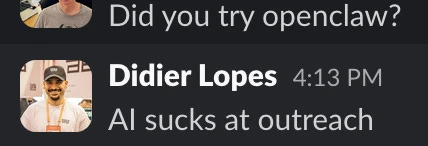
AI sucks at outreach
Before we get into this, let me just say that AI sucks at outreach.
I haven’t actually tried to use AI to write my messages because:
-
If I can’t be bothered to learn about the person I am sending a message to, then I definitely haven’t earned the right for them to reply to me
-
I don't reply to AI messages. So if I have that policy, it would be hypocritical to send an AI message and expect a reply.
So, in this process, I used a LOT of AI. But it doesn’t touch anything related with actually contacting the human - not thinking about the message to be sent, not writing the message to be sent, and definitely not sending the message.
What I built
Here’s what the system looks like end-to-end:
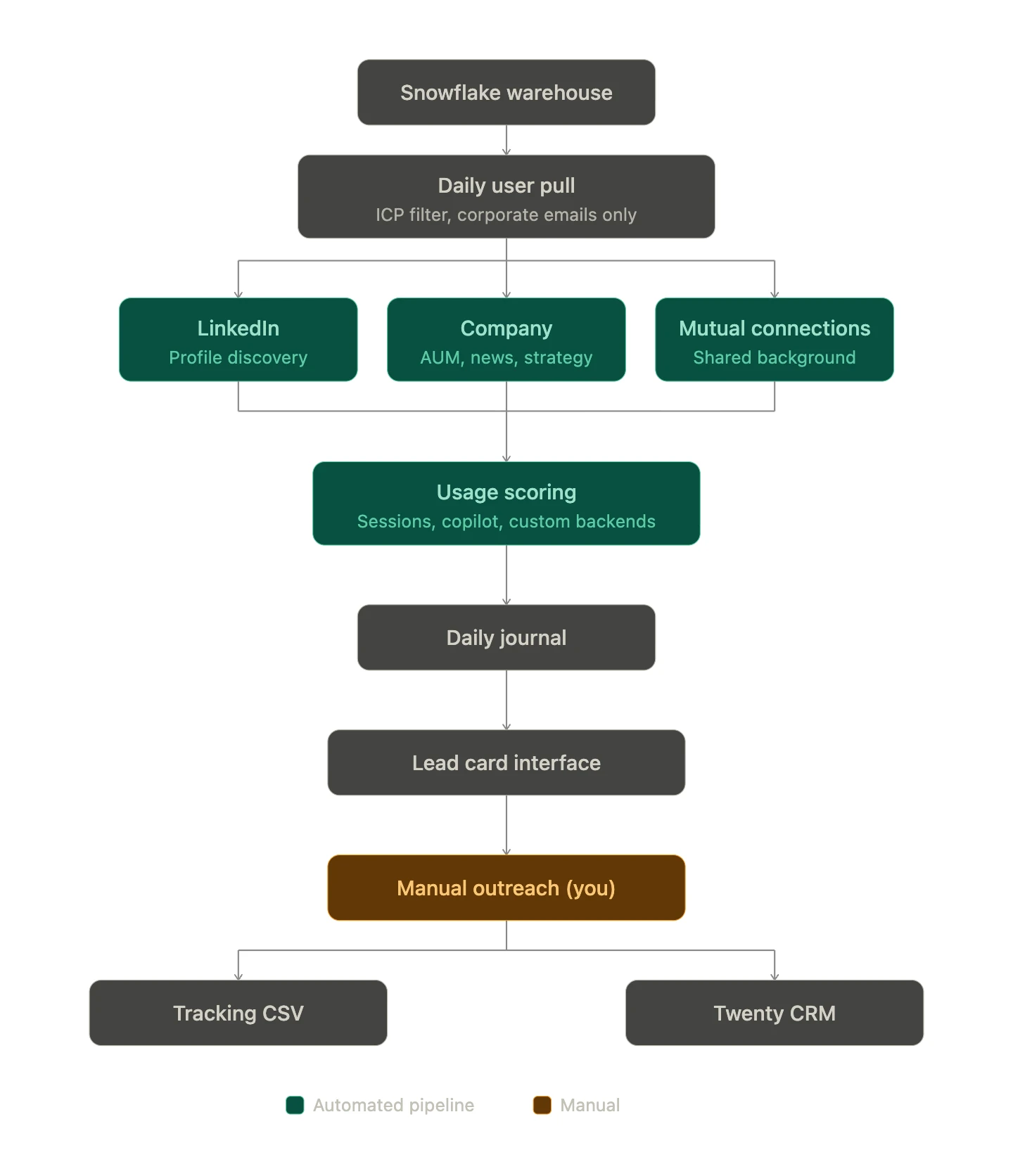
The system pulls OpenBB Workspace free tier analytics (not paid users) from our Snowflake data warehouse every day.
This has email, some usage stats and may have some answers they answered during onboarding (role, firm name, type of firm, AUM).
Then it does enrichment:
-
Looks for the user LinkedIn profile using their name and information they provided on onboarding. It uses Tavily API, but it doesn’t actually need to;
-
Finds information on the firm (AUM, L/S, HF, Equities/Macro/Crypto). This allows me to have a quick overview on the person I’m looking at - at a macro level;
-
Finds common interests with myself. The system knows my background: Portugal, TU Delft, Imperial College London, open source, boxing, running, podcasts. It searches for overlaps with every lead. Did they study at Imperial? Are they Portuguese? Do they contribute to open source on GitHub? Were they at a conference I attended?
Then it ranks everyone (per day) by usage intensity: sessions, number of agent questions, dashboards created, custom backends connected.
The system also tracks whether someone has logged in multiple times over the past few weeks, to have a proxy of engagement. This allows me to adapt the outreach as someone that only uses product once may need special onboarding, whereas someone that is using it heavily may need some power user tips.
Finally, it also does some reconciliation so that users under the same company appear together. And that in the “Context” of a person, we mention overall usage per company.
The output is a daily journal file - a ranked list of people worth reaching out to.
I got tired of reading markdown files
After a couple of weeks I had 20+ journal files sitting in a folder. Scrolling through them in a text editor was painful, so I iterated in a UI for my own personal workflow.
Single Python file, vanilla JavaScript, no frameworks. A retro terminal aesthetic with a CRT scanline effect and pixel font header, because I spend time in this thing every day and I wanted it to feel futuristic. Also, why not.
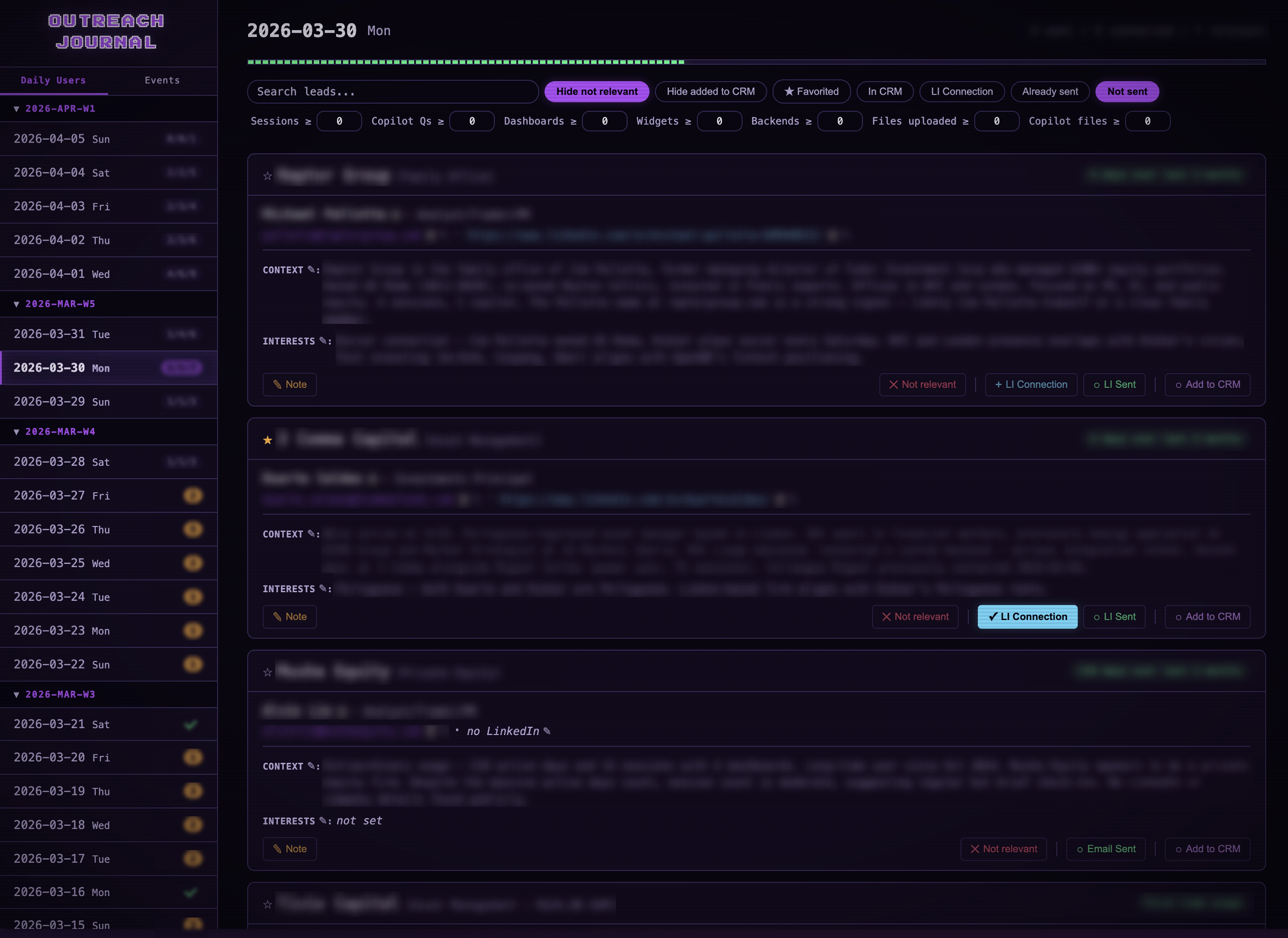
So each lead gets a card: name, role, email, LinkedIn, company context, usage stats, shared interests. Everything editable so I could fix wrong LinkedIn URLs, or update shared interests or company context. I even added a “Note” button to add others (e.g. we’ve met last year; they are getting enough value on the free tier). All of this would update the CSV file accordingly (no longer Markdown).
And I had the global view across all dates that allowed me to look at the promising leads fast.
This provided a much better experience than the list of markdown files.
But then I needed more, so I kept iterating.
Scratching my own itch
Here’s the things I’ve added:
-
Set a contact to “Not Relevant”
-
A daily stats page with “a/b/c” which stands for a - contacts i’ve sent messages (LinkedIn or Email); b - total contacts I could have sent connections on LinkedIn; c - total contacts that are relevant.
- Once b=c match, i.e. after me sending a LinkedIn request to all of these - then we have a single number N. And that N represents the number of people that I need to send a message, LinkedIn or Email, based on whether they have accepted my invite (if I have their LinkedIn ofc)
-
"Add to CRM” which triggers an API in Twenty and adds that contact as prospect, as there’s intent
-
Favorite contacts based on past conversations and being a more promising lead.
-
Filtering - capability to filter by lead name, company, context or interests; but also pretty much all combination of toggles (e.g. not relevant, added to CRM, favorite, LI Connection, …); and then filter based on usage stats as well.
At the end, the page looked somewhat like this:
My flow
Here’s what my flow looks like:
1. Grunt work
I look into each day’s sidebar and check whether I have a/b/c or a single number N.
If a/b/c, that means that I need to go through it to send LinkedIn connections - which is why I called this section Grunt work.
I could automate this - but doing this manually allows me to remember the person, and somehow I’ve found this to give me good ideas on how to reach out to the person. This also allows me to see if I have mutual connections, and/or if we have actually spoke in the past (which has happened!).
If a single number N, then that means that I’m just waiting for folks to accept my LinkedIn connection and I usually give it a few days.
Note: I also validate the LinkedIn profiles (sometimes it gets it wrong); and for profiles that don’t have LinkedIn I look for it manually.
2. Outreach
At this stage, my contacts either have “LinkedIn Connection” set to True or that doesn’t exist.
Then I go into this person’s LinkedIn to check whether they have accepted my invite or it’s pending. Given the time when I sent them the invite I make a decision whether to wait longer for them to accept, send LinkedIn InMail (if you have premium plan) or email directly.
This is by far the part that takes me the most time, and it’s not even close.
I spend some time looking into this person’s background and how they got to where they are; Sometimes it’s not clear to me what their role entails (there’s a LOT of different titles out there, trust me) - and for those I spend some time talking with AI to understand what their role is and if the Workspace even makes sense.
Then I prepare the message, it’s a bit of a free flow - and depends on my mood. But there’s no copy paste involved, only for URLs.
But the message consists of:
-
Saying hi and thanking for connection (if we weren’t connected already)
-
Then mentioning that I noticed that they were using the workspace or that I met them at an event or that we’ve spoke with their team in the past - whichever is strongest really, based on what would make our relationship look closer.
-
Based on their usage patterns and their profile, I try to adapt the message to be the most helpful.
-
Little usage I try to understand better their workflow and offer onboarding.
-
Medium usage I refer to something that based on their profile they might not know about the product (e.g. we announced Skills recently).
-
Heavy usage I talk more about how this can be pitched internally and/or features that aren’t yet announced.
-
-
If this user is based in NYC, I usually offer buying them a drink in person. Nothing beats f2f.
-
In the end I try to mention something particular that we have in common. It can be something like I have lived in London; or something as simple as “I used to bike from TU Delft to The Hague and loved that I could do that”. The goal is to make me relate, in a more human way, with this user.
And then I wait.
Ops, more leads!
Whilst I was waiting for my leads to reply etc..
It got me thinking - “what other leads do we have?”.
And that made me think of all past events that we sponsored; or webinars that we’ve made. Basically any type of event that we have contacts from someone that we can use because they are aware of who we are. Most likely they have previously engaged with me as I’m usually the one attending events.
So I added a “tab” in my Outreach Journal which introduced a folder for ad-hoc events. It essentially has the same characteristics as the flow introduced previously, with the exception that it’s not based on whether they used the product or not - but in them knowing the brand.
Wrap up
This gave me a whole new respect for sales people.
The amount of grind and effort that you must pour into getting a few replies back is very high.
My response rates have heavily improved since I started doing this. It’s far from 100%, but has been well worth the effort. Particularly when I get overall feedback on the product and I’m able to directly feed it back to the time so we can use it for next release.
I read a post the other day that I really enjoyed, and the OP mentioned something along the lines of “thinking about doing the work is not doing the work” and I could relate with this as whilst I got excited about building the overall system, I spent time that I could be investing on actually doing the work (i.e. reaching out to users).
But since I’ve not iterated further in the system, and have been doing the outreach every day.
I don’t think this system is perfect, but it works for me. And I’m going to keep refining it.
After all, if you have a startup and aren’t talking with your users - how can you know that you are building something that people want? 😄