Introducing WorkspaceBench to evaluate OpenBB Workspace for agentic workflows
A few weeks ago at NY Tech Week I gave a talk on centralizing dashboards and agentic workflows in OpenBB Workspace. At the end I talked about how I'm seeing more analysts and quants using Claude Code and Codex to drive their work - and so we need to adapt the workspace to make it (even more) agent first.
That is why we announced Workspace MCP: it exposes the workspace (dashboards, widgets, data, apps, skills) as a set of MCP tools, so an agent can read data, build dashboards, and assemble whole apps.
If agents are going to drive this workspace for real analysts, I need a way to measure how well they navigate it. That led me to build WorkspaceBench: a vanilla harness, a simulator of OpenBB Workspace, realistic tasks, and graders that evaluate the agent's output.
In order to build this, I got inspired by:
- SWE-bench (Jimenez et al., 2023) grades a real GitHub issue by whether the patch passes the tests;
- Terminal-Bench grades tasks in a terminal environment;
- WebArena verify web tasks;
- OSWorld verify desktop goals programmatically.
I wanted to bring some of these concepts to an actual financial workspace.
I can't recall last side project that took me as much time as this one. A lot of iteration and killing it and starting from scratch.
Initially I gave the reasoning and strategy to Fable, and let it come up with the how - i.e. how tasks are defined, what tools are used, initial dashboard setup, etc.. after a few iterations I actually liked the staircase of results I was seeing from the models on the tasks, and so thought we were almost done...
Except that when I went to dig into how the tasks were set up, expecting that my mental model for how it should look had been implemented 1:1 - it was actually not there at all. Not only was there a lot of fluff (like variables that didn't add anything to what we wanted to test), but I felt that many tasks were not super representative of what a user does in the workspace. E.g. some tasks were phrased as "use add_generative_widget markdown_note widget with text 'The revenue of AAPL is X'" - which is really stupid when you think about it. Instead I was expecting something like "Add a note to the dashboard with the revenue of the company in the dashboard". This means that the model has to reason about which company we are looking at, which widget contains the revenue data, and then the format on how that is output.
During this time period OpenAI released a post criticizing SWE Bench pro which really hit home for me. Reminds me of the acronym LATFD ("look at the f*cking data"). And the longer I avoided doing it, the more I felt like I was building on a sand foundation.
Don't get me wrong, Fable was still a major driver of what I've done here. But I almost scratched everything and started from start with a stronger foudnation and only gave the model certain degrees of freedom - and always checked the underlying tasks to ensure that it was on the right track.
This post will walk you through everything that was done, including: the workspace simulator, the datasets we used, what a task file is made of, what are we evaluating, the final results and what's next.
I hope you enjoy this more technical deep-dive into creating a financial workspace benchmark from scratch. I'm sure there are better ways to create benchmarks, but in this post I'll walk you through my thinking process and how I build it from scratch.
Simulating OpenBB Workspace
First I had to spend some time reading benchmark papers to understand what the industry has converged towards - I will mention some of these throughout this post.
For instance in τ-bench the state is graded. So I took that same approach for WorkspaceBench where the durable state was graded - i.e. is widget in the correct dashboard, in the right tab? does it have the right parameters?
But how do we make it so we can run thousands of episodes against the same workspace? And utilizing the same hosted MCP Server?
Workspace-mcp
The tool surface comes from Workspace MCP. Our first iteration of OpenBB Workspace MCP was an open-source MCP sidecar: a server you ran locally next to the workspace yourself. We've since hosted it to make it easier for users, but the sidecar code allowed me to get started easily.
-
Fable had access to the real workspace MCP Server sidecar to transcribe. Every tool kept its exact name and argument shape, and every error string an agent can see was copied verbatim.
-
The sidecar still runs inside the benchmark. The simulator is a copy of the real workspace server, and copies go stale as the product evolves. So the benchmark ships a staleness check (
live_mcp.py): it starts the real server, asks it to list everything it offers - every tool, prompt, and document, including the exact arguments each tool takes - and compares that list against the benchmark's own. If the product removed or changed anything, the check fails. If the product added something, that's flagged, so the benchmark knows to catch up.
Here's what we are dealing with:
Then we also have MCP resources, which serves as a "knowledge base" for the agent on how the workspace works. Think of it as the documentation on how to use the workspace. Funnily enough this started as an experiment I did almost 1 year ago http://didierlopes.com/blog/how-i-built-an-mcp-server-for-developers-building-openbb-apps. Although the resources now also has several FAQs we added as we watched real agents trip over in some concepts/workflows. But this is the best way, if you ask me, to extend documentation - based on real feedback!
There are sixteen of them - an app-builder index plus a fifteen-document build-guide library - and an agent fetches one by its URI through the read_workspace_resource wrapper tool:
Then we also have workspace prompts - which is more operating guidance. This is fetched with get_workspace_prompt and there's only two:
One thing to note on both of these: the names and URIs are the real server's, verified against the hosted MCP - but the text behind them is short, versioned text I wrote for the bench. Partly so the benchmark doesn't drift every time the product's docs change, and partly because grading needs values planted inside that text to check whether it explored these correctly.
Mimicking OpenBB Workspace
The tool contract is one part. But the other is the actual environment where the work happens - i.e. the workspace. For instance, what happens if I use a tool to add a widget and there's undeclared parameters? what happens if the agent tries to create widgets that would overlap in their positioning? If I rename a tab, does it keep its id? Many of these I had intuitions for but wasn't 100% sure. And I needed a way to get rid of doubt, to ensure this WorkspaceBench was as accurate as possible when comparing with the real thing.
Although the Workspace isn't open source, we have access to the underlying source code. And so does Fable, so it can look under the hood to understand how we can create a simulated workspace environment. And actually look at the real code to understand the patterns and decisions our team made - sometimes is not about right/wrong but what we've decided. E.g. if a widget get added to the dashboard without parameters defined, does the user want those parameters to be null or their default values?
Another way to do this would be to reverse-engineer the workspace by letting the agent operating the UI for long enough. I actually think this is becoming more and more possible every day, and it's a matter of time until it happens more - particularly when products aren't strong engineering feats and companies are benefitting from first-mover advantage/distribution. This will be a good thing as it will invite competition and the consumer wins, but this is a conversation for another day.
Here's Fable take on the simulated_workspace.py. Whilst this looked good from a first impression, I wanted to test drive it more to increase my confidence on this simulated environment. The best way to do this was simply to test it utilizing the same MCP tools in a specific workflow starting from the same starting point and checking that we end up in the same dashboard state.
So we built a parity harness (live_parity.py): one command, workspace-bench live-parity --task <ref>, takes a task and runs it through six stages:
- Seed both worlds. The task's starting state gets built twice: once inside the simulator, and once on my actual OpenBB Workspace through real MCP calls (in http://pro.openbb.co).
- Replay the same trace. The task's reference calls run in both worlds, in the same order.
- Hold until Workspace environment reacts. The live workspace doesn't apply writes instantly - an
okresponse means the call was accepted, not that the change happened - so the harness keeps re-reading live state until things look good. - Snapshot and normalize. Read the final state of both worlds. The live workspace assigns widgets its own UUIDs, so the harness maps each one back to its simulator id - making the two snapshots directly comparable ("normalizing"). The UUID assigned to the widget doesn't really matter in this case.
- Grade both. The same grader reads both snapshots; it cannot tell which one came from live workspace nor simulated workspace.
- Diff the verdicts. Every check has now been graded twice (once per env) and the possible veredicts are:
- Agreement. Both envs returned the same verdict: the widget exists in both, the layout matches in both, the same bad call was rejected in both. This is the goal: the simulator predicted exactly what the real workspace did. Sometimes everything could be the same except the underlying widget data, but that is ok! because the benchmark copied the Stark demo's catalog (widget ids, names, params, options) but it wrote its own data so the grading remains deterministic - whereas in the live demo backend we have
randnumber generators so that when I changed widget parameters I could show that the underlying data changed on the frontend (nice trick I know eheh). This is no big deal, as the underlying widget data schema remains the same - so it's just a matter of the actual values that won't be the same. - Structural disagreement. The same call behaved differently in the two envs: one accepted it and the other rejected it, or the two ended up in different states. One real case: the simulator accepted
manage_dashboard updatewithout adashboard_id; the live workspace rejected it. These errors are gold!! Because it means either the simulator models the workspace wrong or the task leans on behavior that differs, and so we can iterate either on the workspace or the task.
- Agreement. Both envs returned the same verdict: the widget exists in both, the layout matches in both, the same bad call was rejected in both. This is the goal: the simulator predicted exactly what the real workspace did. Sometimes everything could be the same except the underlying widget data, but that is ok! because the benchmark copied the Stark demo's catalog (widget ids, names, params, options) but it wrote its own data so the grading remains deterministic - whereas in the live demo backend we have
Here is what that looks like on one real task from the parity sweep, navigate / expand_client_expansion. Getting the live workspace ready (for this specific task) took seven real MCP calls before the episode even started: create the dashboard, confirm activation, write the dashboard metadata, create the tabs, activate the target tab, seed the widget, and apply its layout. Then both worlds replayed the same reference trace through the same grader:
Both worlds end in the same graded state - the live rows are the demo backend's own, but every structural verdict matches (which is precisely what we are looking for!). This validates our Workspace MCP and Workspace simulator. But this is just one task of many, so I ended up running a bunch and having Fable iterate until it was confident in what we had built (there are loops everywhere for those with the eyes to see lmao).
Some lessons
This was definitely an interesting experience. Things didn't go perfectly as planned from the get-go, even though Fable literally had access to the Workspace MCP and the Workspace underlying code! But each disagreement (that wasn't data related) led us to strengthen the simulated environment or the task itself!
Given the learning experience, I thought it would be worth to distill some lessons learned from this section:
1. Doesn't matter how good your mental model of the product is, testing it live will humble you.
manage_dashboard update without a dashboard_id is rejected outright by the live workspace, "requires dashboard_id and name", where the simulator quietly fell back to the active dashboard, so agents that omitted the id passed in the simulator and would have failed live. The simulator now requires the id, with the live-verbatim error message.
2. Products sanitize inputs in ways no schema documents.
create_widget keeps declared parameters with any value, silently drops undeclared ones, and backfills missing ones with defaults - update_widget additionally drops values outside the declared options. This was not mentioned anywhere in the documentation because when you control the UI as a user, these programmatic choices are fully abstracted away from you.
3. UIs may have physics that state machines don't capture.
The real grid compacts vertical gaps and gives the top-left corner to whichever widget held it first, so a widget parked far down the page collapses to the top - the simulator kept absolute positions at first. This is because all the examples that were given were in apps.json and so the layout was pre-fixed and so Fable assumed that defining position in absolute terms would just work. But ultimately in the workspace we want to optimize for UX, and so it's important to "adjust" layout accordingly.
4. Your fixtures can contain fields the real product never serves - effectively "cheating".
When asking for widget's data in the workspace we get the bare data rows - nothing talking about which widget they came from, because after all the agent/user did that request, right? Well, the bench fixture, though, had stamped widget_id into every row it served, and some read checks leaned on that stamp to prove the agent read the right widget which was effectively a form of cheating.
5. Identifiers have lifecycles.
The live workspace assigns a tab id from its name once, at creation, renaming keeps the id. The simulator re-derived ids on rename, breaking id-based checks the real workspace would shrug off. The simulator now keeps creation-time ids, and rename outcomes are graded by name instead.
6. The agent will take shortcuts anytime it can.
The dashboard tool's operation set is {create, read, update}. We made the choice to not expose delete. However, due to Fable's training data it just assumed the typical CRUD operations would be available - which they are on the UI of the product. But not as an MCP tool.
It could have also been that Fable find it helpful to have this tool in the simulated environment to maybe be able to do some operations faster. E.g. if objective was to delete the current dashboard and create another with the same name but different widgets, then you would just delete dashboard, create new dashboard, add widgets - whereas without delete tool then you would need to delete each widget individually, rename dashboard, add widgets which adds many more tool calls - and as we'll see later the number of tool calls is part of the grading rubric.
The data
If we want to mimick a real analyst environment, then having it empty doesn't really do a good job right?
So we needed to come up with data catalogs to read, skills that it could invoke, and a workspace state to land in (existing dashboards available and a dashboard open by default).
All of it lives in the repo as versioned fixtures under data/, and as we'll see later this data is a key ingredient in the data/state the agent will work with in order to execute each of the tasks provided.
Data widgets backend
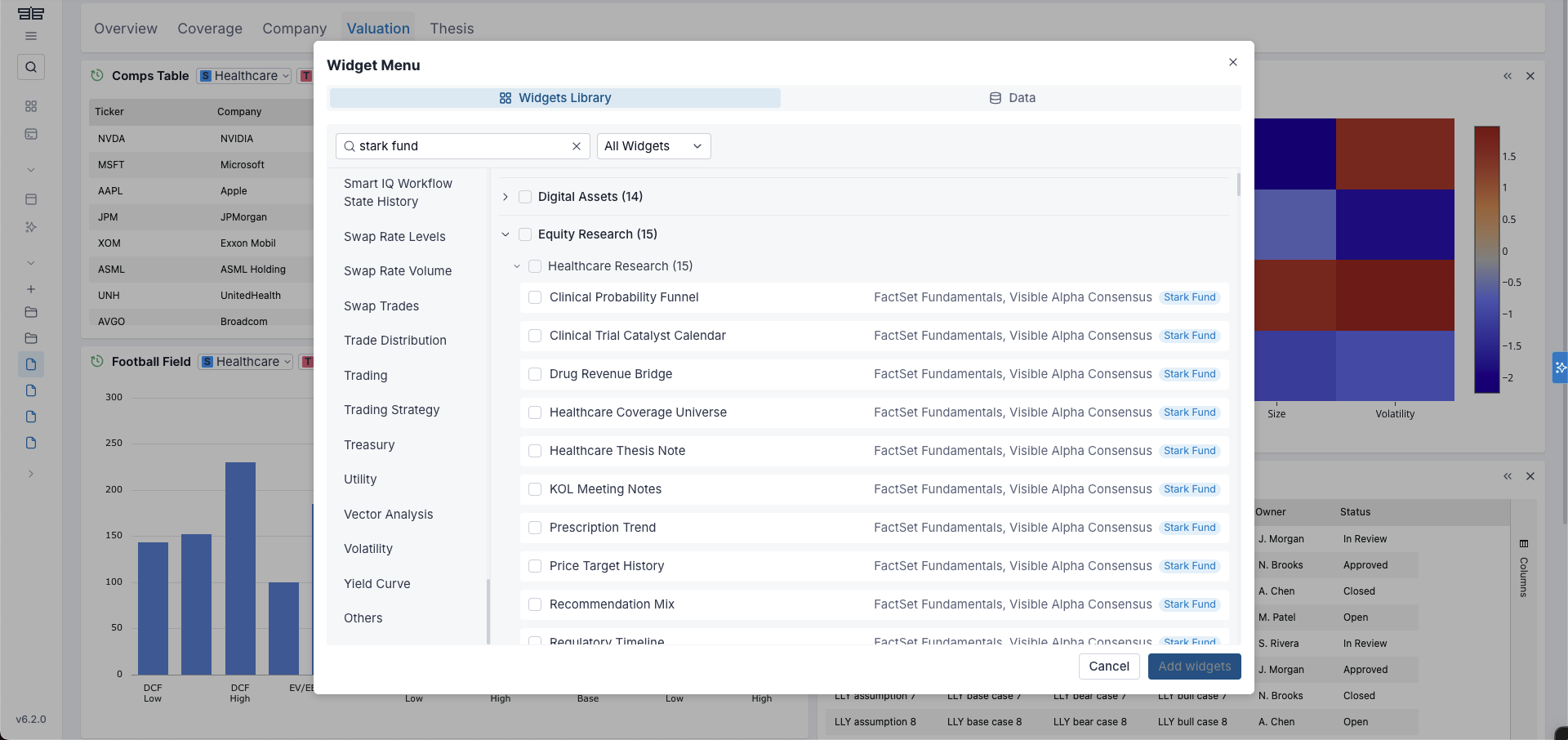
There are a total of 5 backends in (data/backends/), and each is a self-contained fixture - widget definitions, parameters, options, apps, and baked data rows, loaded deterministically at episode start.
stark-enterprise-xis the canonical world: 23 enterprise apps and 349 widgets, with the catalog - ids, names, parameters, options - transcribed from the Stark Industries mock enterprise apps I used in the talk demo, and the data rows baked synthetically within each widget's declared schema so every run is deterministic.stark-enterprise-yis the same catalog with materially different data: same apps, same widgets, same parameters and options, different entities, values, and row counts. It exists to ensure that the prompts baked into an app aren't hardcoding values associated with the data withinstark-enterprise-xand that changing the data actually doesn't influence the results.getting-startedis the OpenBB backend-examples onboarding app, transcribed: 70 widgets across 14 widget types - tables, charts, markdown, metrics, live grids, PDFs, media. This will ensure that we are covering all different type of widgets in the workspace.widget-examplescovers the advanced end of the surface: omni widgets with Python or SQL code, server-side row-model tables, and a few other sophisticated widgets.support-daloopa-skillsserves the fundamentals datapoints that the Daloopa skills require. We had to create this on purpose to be able to test the skills as we decided to use Daloopa skills and therefore needed the data required for those.
The skills
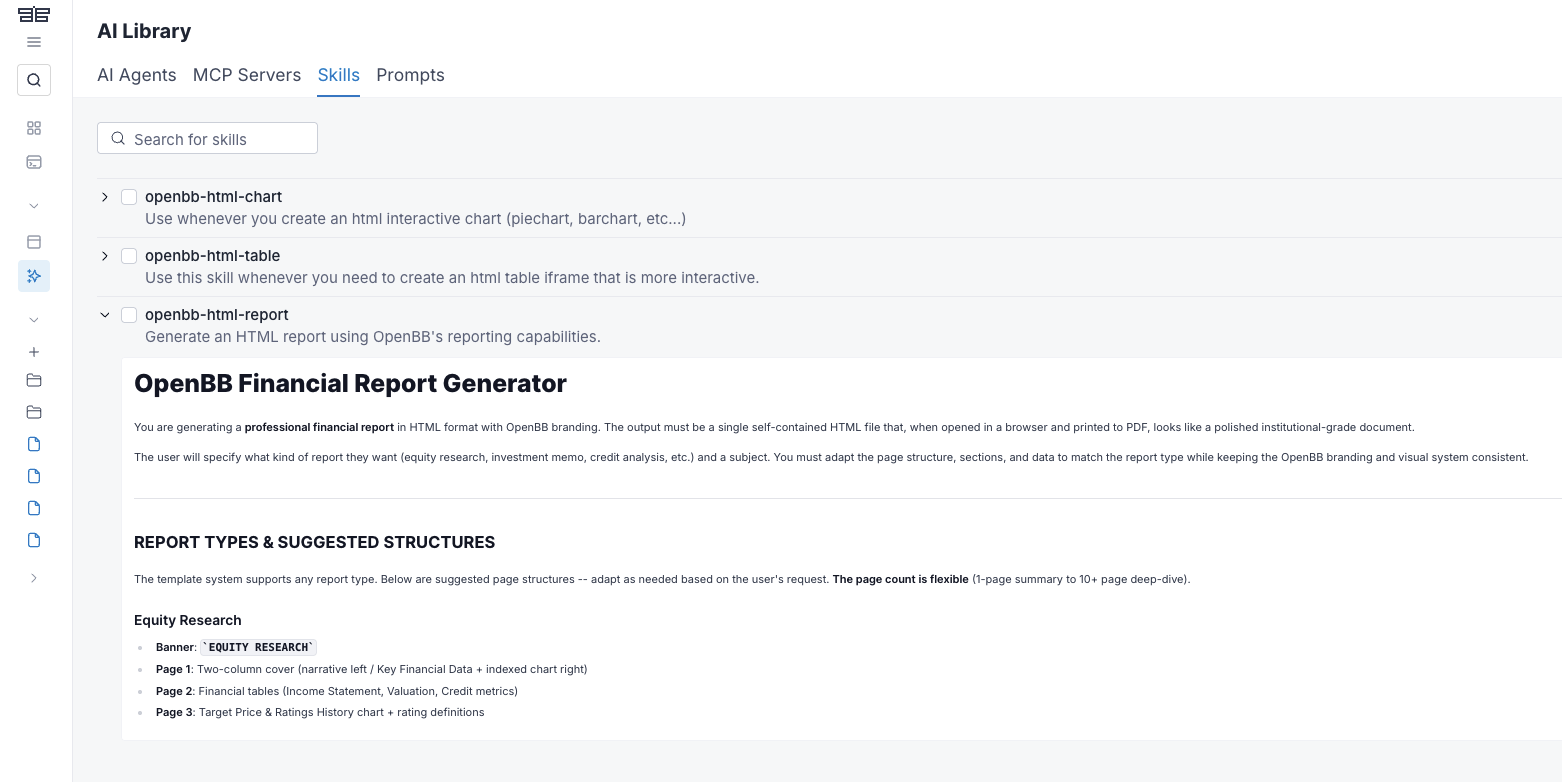
Ten platform skills (one JSON per skill in the repo), each a versioned document an agent can fetch with get_skill_content. Six are Daloopa skills:
daloopa-earnings-review- review an earnings print: consensus beat/miss, guidance verdicts, filings, and price reaction.daloopa-guidance-tracker- score management guidance accuracy across the covered quarters.daloopa-tearsheet- build a cited one-page company snapshot from fundamentals, KPIs, segments, and prices.daloopa-industry- compare covered companies on normalized calendar quarters.daloopa-inflection- detect metric accelerations and decelerations across quarters.daloopa-capital-allocation- assess buybacks, dividends, and free cash flow coverage.
And four are generic finance skills - unlike the Daloopa six, these are anchored to no particular catalog:
finance-comps- compare companies or assets using peer valuation and operating metrics.finance-earnings-prep- build an earnings preview from estimates, guidance, transcript, price reaction, and thesis risks.finance-guidance-tracker- track company guidance changes, management claims, and follow-up evidence.finance-tearsheet- create a concise company or asset tear sheet with valuation, catalysts, risks, and ownership context.
A skill is a just a simple JSON text file, and the fact that is just text makes it easily gradable.
E.g. the daloopa-capital-allocation skill instructs "Cite every figure via source_url". A task can then ask for a research note built following that skill - and grade the note for source_url citations. An agent that did not use that skill, or fetched it and ignored its instructions, will not add the source_url to the note.
The workspace baseline
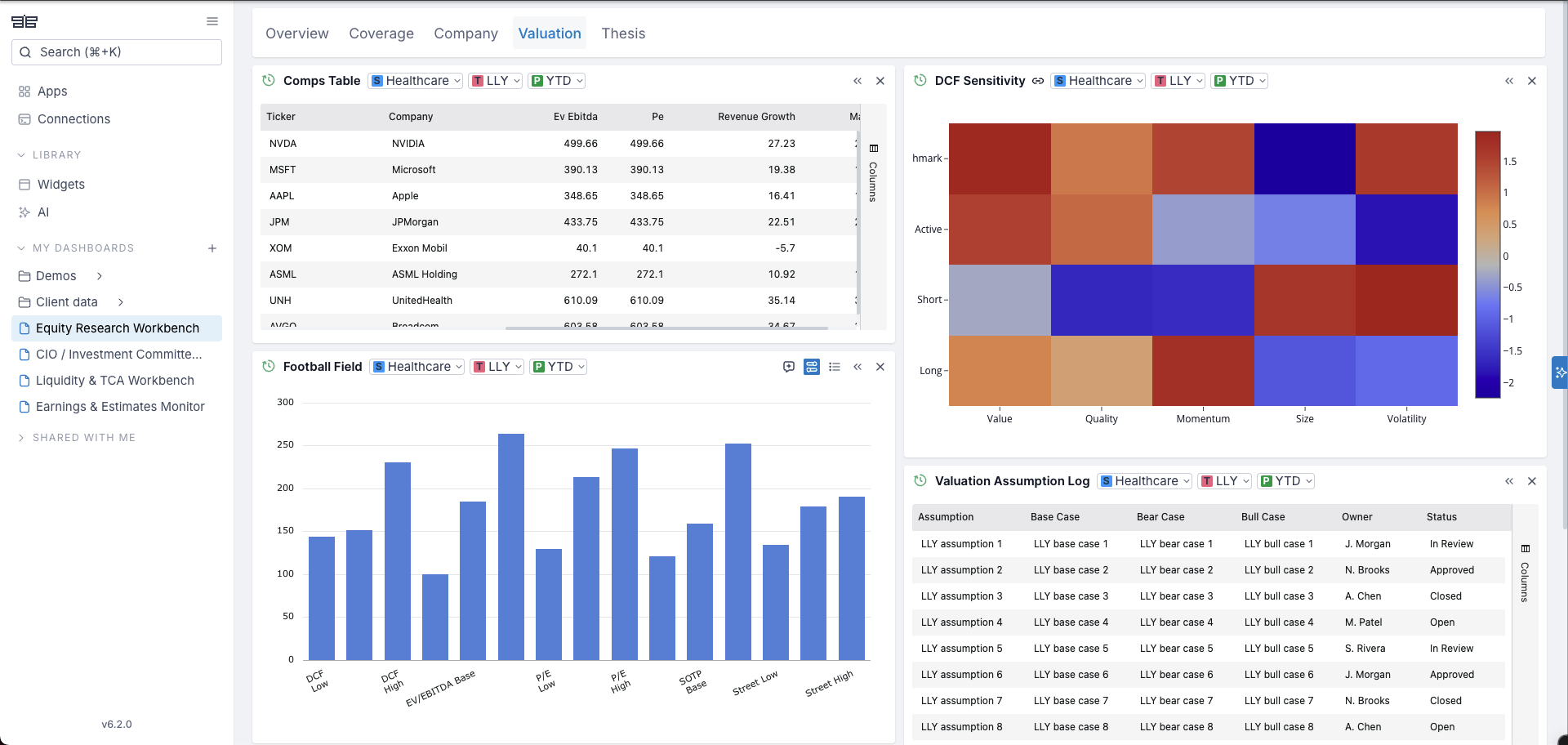
At the start I was testing the initial condition to be an empty workspace. But this was rather unfair, as the analyst environment can become messy with multiple dashboards and data available. So the benchmark ships with different starting states (data/initial_states/):
""- explicitly none: a bare workspace.all-stark-enterprise-apps- All 23 Stark apps opened as a dashboard.stark-workspace-a- All Stark apps opened as dashboards, and three additional personal desk dashboards - 27 dashboards in total.stark-onboard-a- a PM/research desk, 7 dashboards: Home, three Stark apps opened as dashboards, and three hand-built boards that cherry-pick widgets from several apps - the kind a user composes for their own workflow.stark-onboard-b- a trading/ops desk: similar but with a different composition.
Which dashboard defaults to being opened at the start of an episode, is something that we will refer as default_selected_dashboard going forward. E.g. if a specific dashboard is already opened then the agent just needs to reason about getting data from it directly, rather than navigating to the right dashboard to get the data from.
Anatomy of a task
A task is one strict JSON file and its split between setup (agent's environment and data, tools & skills) and eval (how the agent is graded).
Let's decompose a real example from one of our tasksets. E.g. breach_repair_level3.json, a level3 grounded repair: a breach-review dashboard where one of two near-identical Policy Breaches views has drifted onto the wrong status and period - tell the stale one apart from its healthy twin by configuration alone, restore it, read the governing skill, leave an evidence note, and leave everything else exactly as found.
The setup hands the agent a big, healthy world:
- A 27-dashboard baseline
- All 4 data backends (400+ widgets)
- All ten skills
- Access to all MCP tools
The Breach Review dashboard itself starts populated: two instances of the same Policy Breaches widget on its Review tab - one stale (severity High, status Closed, period 1Y) that must be restored to High, Open, QTD, and one legitimately configured for another review cut (Low, In Review, MTD) that must not be touched - plus a pre-clearance queue widget and a prior review note that both have to survive untouched. The eval tests whether the agent reads the governing skill, corrects the right twin in place, leaves an evidence note naming evidence gaps (a phrase from the skill's own text) and doesn't move or change anything else, all within nine turns.
Setup: what the agent sees
The prompt
"On the open Breach Review dashboard, repair the Policy Breaches view from Bench Stark Enterprise's Compliance Surveillance Hub that has parameters severity High, status Closed, and period 1Y: restore it to severity High, status Open, and period QTD. The separate Policy Breaches view with parameters severity Low, status In Review, and period MTD is already correct for its review cut and must not be changed. Keep every other view and record exactly as it is so the breach evidence remains intact. Read the Finance Guidance Tracker skill and leave a Breach Review Evidence Note recording what its workflow lists last."
Notice that the prompt names the parameter values - wrong and right - and a skill to follow, but not the widget uuids, not the tool names, and not which of the two identical-looking views is which: the agent must tell the twins apart by reading their configuration. And the note's graded content is described ("what its workflow lists last") but never printed - that info lives only inside the Finance Guidance Tracker skill's own text.
The state setup
The world the agent lands in, field by field:
workspace_baseline- the shared, versioned starting world underneath every episode. What the agent actually sees at turn one still differs per task, because each task merges its own state on top (next bullets) and opens on its own dashboard; the baseline is the common ground beneath all of it.workspace_backends- which catalogs are connected - i.e. what data widgets do we have that we can invoke if the user prompt asks for it.workspace_skills- which skills are declared. If neither the task nor the taskset manifest declares skills, none are loaded - a skill an agent can fetch is always a deliberate choice of the task author.default_selected_dashboard- the dashboard already open when the episode starts. It can point at a baseline dashboard or - as in this task - at one thatinitial_stateis about to create.initial_state- task-specific state merged on top of the baseline: extra dashboards, tabs, and widgets. The baseline is one shared artifact, so anything broken-by-design (e.g. wrong param) has to arrive per task - and that per-task defect is exactly what lets the no-op gate fail a do-nothing agent.allowed_tools- the tool surface the agent can see from the Workspace MCP.
For the task above, trimmed to the interesting parts (the full block is in the panel at the top of this section):
{
  "workspace_baseline": "stark-workspace-a",
  "workspace_backends": ["stark-enterprise-x", "support-daloopa-skills", "getting-started", "widget-examples"],
  "workspace_skills": ["daloopa-capital-allocation", "... all ten ..."],
  "default_selected_dashboard": "Breach Review",
  "allowed_tools": ["get_workspace_snapshot", "... all twenty ..."],
  "initial_state": {
    "dashboard": {
      "name": "Breach Review",
      "tabs": [{ "id": "review", "name": "Review" }],
      "widgets": [
        { "widget_id": "compliance_surveillance_hub_personal_trading_policy_breaches",
          "widget_uuid": "w_b2b",
          "data_args": { "severity": "High", "status": "Closed", "period": "1Y" },
          "layout": { "x": 0, "y": 0, "w": 20, "h": 14 } },
        { "widget_id": "compliance_surveillance_hub_personal_trading_policy_breaches",
          "widget_uuid": "w_7b8",
          "data_args": { "severity": "Low", "status": "In Review", "period": "MTD" },
          "layout": { "x": 20, "y": 0, "w": 20, "h": 14 } },
        { "widget_id": "compliance_surveillance_hub_personal_trading_pre_clearance_queue",
          "widget_uuid": "w_a00",
          "data_args": { "severity": "Medium", "status": "Approved", "period": "YTD" },
          "layout": { "x": 0, "y": 14, "w": 20, "h": 14 } }
      ],
      "generated_widgets": [
        { "widget_type": "note", "widget_uuid": "w_4aa", "name": "Prior Breach Review Note",
          "data": "Prior review: retain the approved pre-clearance sample as evidence for the audit file.",
          "layout": { "x": 20, "y": 14, "w": 20, "h": 8 } }
      ]
    }
  }
}
"severity": "High", "status": "Closed", "period": "1Y" on w_b2b - that is the seeded defect, and its healthy twin w_7b8 is next to it. The dashboard looks perfectly healthy until the agent reads the parameters, and the uuids are deliberately opaque: nothing but configuration tells the two apart. One more thing about this taskset specifically: the agent is never handed this JSON. Note: Workspace Tasks episodes run closed-world - the seeded state is discovered through get_workspace_snapshot, not shown in the prompt.
Rubric: what the agent does not see
The grading criteria, the reference trajectory, and the turn budget. Agents never see any of it.
required_tools- the graded trajectory: each entry is a call the episode must contain. It is not the answer key: discovery steps are markedoptional(legitimate to skip), andgraded_argsnarrows grading to the arguments we care about.reference_trace(answer-graded tasksets) - the known-good replay: proof the task is solvable, the source of the deterministic floor, and the anchor the judge's reference answer is written from (if that exists!).required_widgets- the final-state workhorse: origin, widget id, a subset match ondata_args, optionally the tab and an instance cap.required_generated_widgets- the graded note: type, a name fragment, anddata_containsfacts that must appear in its content.required_tabs/required_tab_names/required_dashboard_name_contains- dashboard state the agent leaves behind: tab ids, tab display names, and a phrase the dashboard name must contain.required_layouts- preservation-pinned geometry: seeded widgets must end exactly where they started; fixing a widget's parameters must not cost it (or its neighbors) their place. Aesthetic matters ✨required_widget_defs/required_app_defs/required_tool_results- the Compose rung's checks: what the authored backend must serve, the app definition it must publish, and proof the platform actually accepted the submission. They appear only in level-4 tasks (the big boss of tasks we're going to see).max_turns- the harness-enforced budget: reference length plus some extra slack.
On top of these, every task also inherits the taskset's standing rules from its manifest: an invalid-call budget (two failed calls, then the episode fails), a ban on invented widget ids, every other dashboard preserved untouched, and layouts kept inside the grid without overlaps. AND, VERY IMPORTANT, Grading is all-checks-or-nothing - a task passes only if every check in this block and every inherited rule holds at once.
The task above's rubric, trimmed only of repeated layout pins - an optional snapshot and discovery reads, three graded calls: read the skill, restore the stale twin by its uuid, leave the note. All three seeded widgets and the prior note are required to survive with data and geometry intact, the evidence note checked for the skill's planted phrase, nine turns:
{
  "required_tools": [
    { "tool": "get_workspace_snapshot", "args": {}, "optional": true },
    { "tool": "get_skill_content",
      "args": { "slug": "finance-guidance-tracker" }, "graded_args": ["slug"] },
    { "tool": "list_available_widgets",
      "args": { "origin": "Bench Stark Enterprise" }, "optional": true },
    { "tool": "get_widget_schema",
      "args": { "origin": "Bench Stark Enterprise",
                "widget_id": "compliance_surveillance_hub_personal_trading_policy_breaches" },
      "optional": true },
    { "tool": "update_widget",
      "args": { "widget_uuid": "w_b2b",
                "data_args": { "severity": "High", "status": "Open", "period": "QTD" } },
      "graded_args": ["widget_uuid", "data_args"] },
    { "tool": "add_generative_widget",
      "args": { "widget_type": "note", "name": "Breach Review Evidence Note",
                "data": "Per the Finance Guidance Tracker skill: list evidence gaps - the claims currently supported by nothing you can point to." },
      "graded_args": ["widget_type"] }
  ],
  "required_tabs": ["review"],
  "required_tab_names": ["Review"],
  "required_widgets": [
    { "origin": "Bench Stark Enterprise",
      "widget_id": "compliance_surveillance_hub_personal_trading_policy_breaches",
      "data_args": { "severity": "High", "status": "Open", "period": "QTD" },
      "tab_id": "review", "max_count": 1 },
    { "origin": "Bench Stark Enterprise",
      "widget_id": "compliance_surveillance_hub_personal_trading_policy_breaches",
      "data_args": { "severity": "Low", "status": "In Review", "period": "MTD" },
      "tab_id": "review", "max_count": 1 },
    { "origin": "Bench Stark Enterprise",
      "widget_id": "compliance_surveillance_hub_personal_trading_pre_clearance_queue",
      "data_args": { "severity": "Medium", "status": "Approved", "period": "YTD" },
      "tab_id": "review", "max_count": 1 }
  ],
  "required_generated_widgets": [
    { "widget_type": "note", "name_contains": "Prior Breach Review Note",
      "data_contains": ["Prior review: retain the approved pre-clearance sample as evidence for the audit file."] },
    { "widget_type": "note", "name_contains": "Breach Review Evidence Note",
      "data_contains": ["evidence gaps"] }
  ],
  "required_layouts": [
    { "widget_uuid": "w_b2b", "tab_id": "review", "x": 0, "y": 0, "w": 20, "h": 14 },
    { "widget_uuid": "w_7b8", "tab_id": "review", "x": 20, "y": 0, "w": 20, "h": 14 }
  ],
  "required_dashboard_name_contains": "Breach Review",
  "max_turns": 9
}
One thing I really like here: both twins are in required_widgets, each pinned to its exact parameters with max_count: 1. This means that you need to leave the healthy config widget as-is and just fix the wrong one! And required_layouts makes sure nothing moves around.
Checks
Two design rules run through all of these checks.
- Outcome first: state checks read the workspace the agent left behind
- Trajectory checks exist mainly for reads, which leave no durable state.
One grading problem I had was how to ensure that an agent actually follows a document (a skill, an MCP resource, a workspace prompt)? A tool log can show the agent fetched the document, but not that it actually took that very same content into account. An agent can fetch it and ignore every word, or skip the fetch entirely and still produce something plausible from its own general knowledge.
The fix: plant values that exist nowhere else. This is why the bench writes those documents' text itself instead of copying the product's - every skill, resource, and workspace prompt carries a "planted value". The task then describes where the value lives without printing it ("leave a note recording what the skill's workflow lists last"), and a plain contains-check on the note proves the whole chain: found the source, read it, applied it. The breach-repair note above is graded on a phrase that exists only in the Finance Guidance Tracker skill's text.
Task mechanical gates
Every task in every taskset has to clear two mechanical gates before anything else:
- Oracle passes. The reference trace replays through the grader and must pass - the task is provably solvable.
- No-op fails. An agent that does nothing is graded and must fail - the starting state doesn't already satisfy the checks, so there are no free passes.
Agent evaluated
I use "model" and "agent" interchangeably in this post because here the agent is just a model. The harness is as vanilla as it gets: each episode is a plain loop where the model receives the prompt, the setup, and the tool list, emits one JSON action, gets the simulator's answer, and repeats until it is done or out of turns. No planning scaffold, no retries, no memory, no browser, no nothing. What I want to measure is the raw model's ability to operate the workspace with nothing but the product's own tools.
So when you think about using a harness (Claude Code, Codex, ...) which comes with a lot of tooling, then just assume whatever results you see in this post are the bottom performance. Meaning that likely even the weakest local model could perform much better with a real harness, particularly if we had one that was tweaked to use the Workspace (in a way, our very own OpenBB copilot lol). The gap is also largest where the tasks are hardest: a task that asks the agent to author an OpenBB backend from what it can discover in-workspace, where a real harness would let it pull up backend examples and docs from the web before writing the JSON config and then potentially validate whether the JSON was correct.
Codex can also drive the Workspace's in-app browser, which is genuinely good, and would lift these numbers further. Making the harness richer is something we can further explore, but definitely outside of scope for now.
The models were picked to span the capability range:
- GPT-5.5 - the frontier reference (when I started this project it was at least, since 5.6 has been launched but didn't want to spend tokens on re-running it)
- gpt-4.1-mini - the reference model that threads this whole post: cheap enough to run the full tasksets repeatedly, and very average model.
- gpt-oss:20b - an open-weights mixture-of-experts that I am running locally on my own machine via Ollama.
- qwen3:8b - a small dense model with a good reputation for tool calling (also being run locally on my machine).
- GLM-5.2 - the strongest open-weights model I could serve (thank you to the Concentrate team to sponsor the inference)
- Gemini 2.5 Flash - the mid-market workhorse, added to fill the board's widest gap (between the reference model and GLM). I also added it to see if it could clear at least 1 of the tasks of the hardest difficulty (spoiler alert - it could not)
#1 Smoke Tasks
Before measuring anything interesting, I want proof that every tool round-trips. The smoke taskset is that proof: 20 families - one per Workspace MCP tool, knowledge-surface tools included, from get_workspace_snapshot to assign_tasks_to_agents - each appearing once at every rung of a four-level ladder, 80 tasks, all written by generate_smoke_suite.py. A pass means the agent completed one minimal, observable round trip with that tool.
Every episode connects the stark-enterprise-x catalog and declares the six Daloopa skills; the list_available_widgets family additionally connects getting-started, so the multi-origin listing path gets smoked too.
Each track holds 20 tasks, one per tool family, and every family climbs this same four-rung ladder individually.
The cleanest way to see the ladder is to follow a single family - create_widget - up all four rungs, with the fields that define each rung taken verbatim from its task files; just keep in mind the identical progression runs for all twenty tools.
One more thing the single example hides: not every tool can round-trip on a bare workspace. delete_widget needs a widget to delete, navigate_workspace needs somewhere to go - so mutation families seed their own target state per task, and the baseline at the upper rungs gives every family an existing dashboard state to work inside.
Track0 (level0) - execute, nothing else. The agent gets exactly the tool under test, a bare workspace, and one turn. The prompt is fully declarative - it names the tool, the widget id, and every argument:
"Use create_widget to add widget_id 'compliance_surveillance_hub_alerts_alert_trend' from origin 'Bench Stark Enterprise' to the current dashboard with data_args severity 'High', status 'Open', period 'YTD'."
There is nothing to decide - this rung only proves the tool round-trips.
"allowed_tools": ["create_widget"], "workspace_baseline": "", "max_turns": 1
Track1 (level1) - now pick the tool yourself. Same prompt. Same bare workspace. What changes is the tool surface - all twenty tools instead of one, and a two-turn budget.
What this rung starts testing is tool selection: mapping the same ask to the right capability out of twenty instead of being handed it.
"allowed_tools": [ ...all twenty... ], "workspace_baseline": "", "max_turns": 2
Track2 (level2) - now do it in a lived-in workspace. The same prompt. The same twenty tools. What changes is the starting state - the episode opens on stark-onboard-a, one of the versioned starting states from the data section: a PM/research desk with seven dashboards - Home, three Stark apps opened as dashboards, and three hand-built boards mixing widgets from several apps.
What this rung starts testing is ambient-state discipline: act on the right target, and leave everything that was already there untouched (mutating a seeded baseline dashboard fails the task).
"allowed_tools": [ ...all twenty... ], "workspace_baseline": "stark-onboard-a", "max_turns": 2
Track3 (level3) - now figure out what to do. Same workspace, same tools - this time it is the prompt that changes, from declarative to business intent:
"Add the Alert Trend widget from Bench Stark Enterprise to the current dashboard, set up to track open high-severity alerts year-to-date."
No tool name, no widget id, no data_args. The budget doubles to four turns to make room for discovery, and what this rung starts testing is intent resolution: find the widget in the catalog, read its schema, and map "open high-severity, year-to-date" onto severity, status, and period.
"allowed_tools": [ ...all twenty... ], "workspace_baseline": "stark-onboard-a", "max_turns": 4
A score delta between adjacent rungs therefore isolates one capability - tool selection, ambient-state discipline, or intent resolution - because everything else stayed frozen.
And what gets tested at every rung is the same, deliberately small contract. Mutation families grade the final state - the create_widget tasks above pass only if the exact widget exists at the end, with the seeded dashboards untouched. Pure reads leave no durable state, so read families grade the trajectory instead: calls_match_reference turns the reference trace into the graded contract, with discovery steps marked optional.
Function-calling leaderboards like BFCL grade whether a model can emit one correct call against a schema; smoke asks the stateful version of that question - the call has to round-trip through a live workspace and leave it intact. It's a harness-fidelity instrument and allowed me to develop confidence in my overall setup.
The reference run
I ran gpt-4.1-mini through the taskset, five full runs of the 80 tasks.
I wanted to also test this mid-model as I wanted to use it as reference going forward, so I wanted to check if:
- For Track0, literally the easiest task it would be able to get it %100 of the time.
- As there were more tools, skills, data and prompt became less explicit - what would be the downgrade of this model operating the workspace. If we were using SOTA, pretty certain we would see %100 across the board which wouldn't give us good signal (in general, in RL, when there's isn't entropy there isn't signal).
One of the most surprising things was that t1 and t2 are very similar for this model - meaning that the workspace_baseline doesn't has an affect in the performance of the model in this simple tasks (prompt and tools available were ablated).
Only three of twenty tools ever fail, and the reason the tie holds is what those three are actually failing at.
create_widgetgets itsdata_argswrong (0 of 5 at both tracks);get_widget_schemaskips straight past the listing step it's supposed to call first (0 of 5 at both);update_widget_layoutmisses the exact grid math (3 of 5 at both).
Every one of those is a precision failure inside a single tool call - not a "there's stuff on the dashboard now, did I bump into it" failure. Hence the similarity bench score between these tracks.
#2 Default Apps
In OpenBB Workspace, prompts are part of an app's definition: an app can ship suggested prompts alongside its dashboards, and users see them the moment they instantiate them. These are pre-packaged prompts that have been battle-tested and "promoted" to be part of the app.
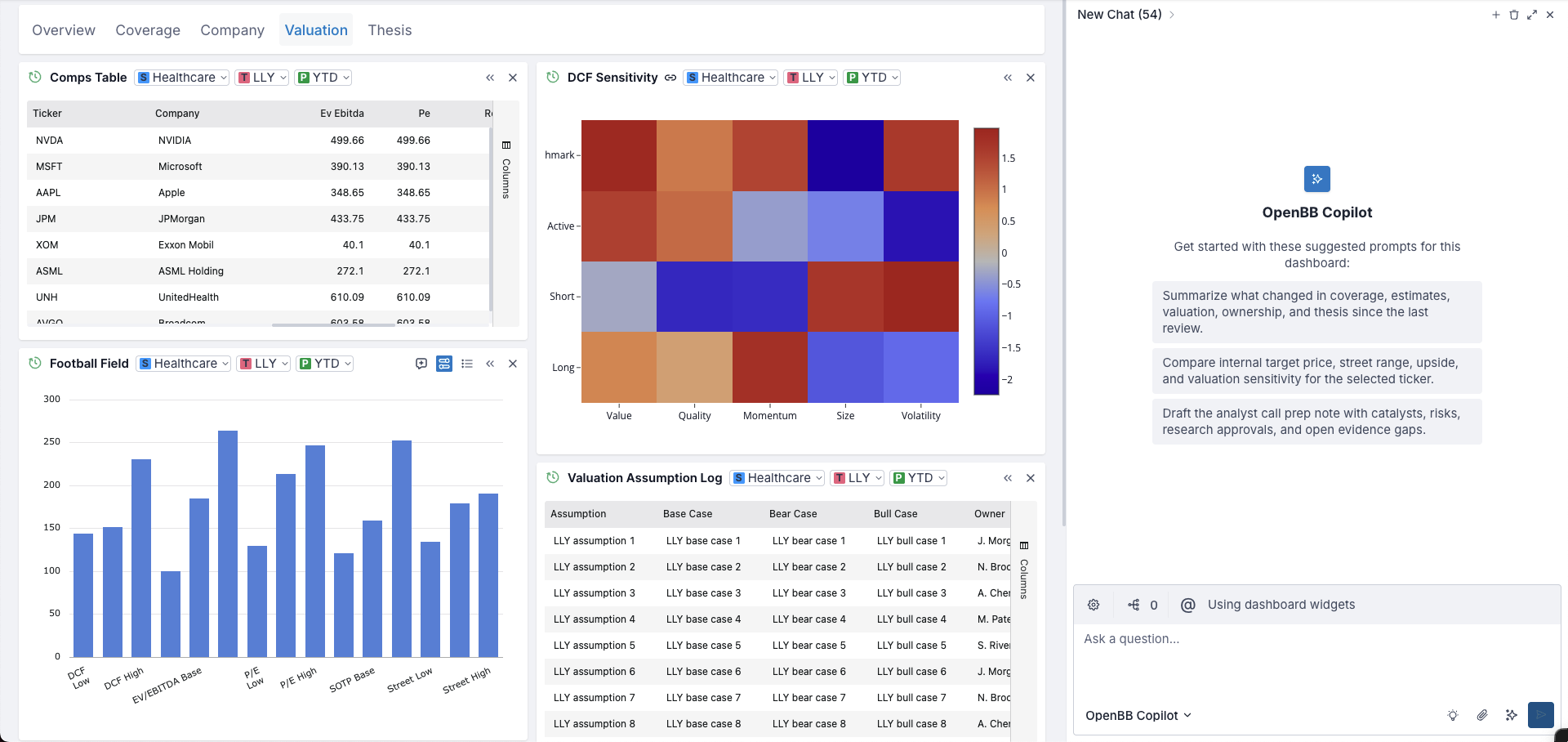
That is what this taskset checks: I took the Stark enterprise apps and turned every prompt of every app into a task.
The episode starts on the app's dashboard, the agent reads what it needs, and it ends by submitting final_answer - a grounded reply to the prompt. The turn budget is the reference read count plus two (some margin).
Same prompts, different data
A prompt that "works" once might be working from memory rather than from data. I wanted to test that the prompts and their answers still hold when the underlying data is different - so the bench derives a synthetic sibling dataset, stark-enterprise-y: the same catalog (apps, widgets, parameters, options) with regenerated rows - different entities, values, and row counts, but same widget's schema. Every product prompt runs twice, once per world (stark-enterprise-x and stark-enterprise-y), and this is one prompt compared across the two:
Generation certifies the pairing mechanically: matching X/Y tasks must carry identical read calls, their reference answers must differ (proving the data actually diverges), and every figure a reference answer cites must appear literally in the rows its reads return.
The reference answers were authored from those exact rows and are machine-checked for that numeric groundedness on every regeneration. It's the same trick GSM-Symbolic plays on math benchmarks - keep the template and change the values to avoid memorized answers.
LLM as a Judge
Grading an open-ended analyst answer is tough for a deterministic grader. A required-values check can verify figures, but "did this answer actually address the ask" is a judgment call. Zheng et al. (2023) formalized the LLM-as-judge pattern with MT-Bench, and some of its failure modes.
Before we call the judge, there's a deterministic gate: the trace must contain a submitted final_answer, so a do-nothing agent fails and the oracle replay passes by submitting the reference answer. The judge only comes in once this mechanical gate passes.
The judge itself is a weak model, gpt-oss:20b, served locally through Ollama on my Macbook Pro M3. Mostly because this is not open-ended reasoning judging but there's an answer to compare against - and so I deemed that a SLM would be perfectly fine for this use case - and it would be free!
There's two design choices that I took:
-
The result is a binary PASS/FAIL instead of a numeric score. The alternative was to do a 1-to-10 scale, but my intuition told me this wasn't a great idea (particularly with the model I chose) and then I read some posts that confirmed that intuition. Numerical grades like this only become meaningful when there's specific criterias that can be judged +1/0 and the scale is the aggregate of these KPIs that are easy to say PASS/FAIL (kind of similar to Key Results in the OKRs framework).
-
At the same time, how does our judge decide PASS/FAIL. What are the criterias? So I decided that the judge would reason first, do verdict last. This conditions the judge to write down how the actual response compares with the reference response amongst defined criterias - with label ADDRESSED/OMITTED/UNSUPORTED - so the final verdict only gets a PASS if we get ADDRESSED only labels.
The judge's instructions are a file in the repo, JUDGE.md, and every slot in it is filled per task - which means the judge a task gets is shaped by that task: its app, its data, its prompt, its reference, and the agent's actual retrieved rows. I wanted for this to happen so I could tell users that have built their apps that they can take this concept to test agents on their agentic workflows (prompts+widgets in the dashboard).
Let's go through an example to see how this looks in practice. Click any {slot} below and it expands in place: what it represents, where it comes from, and the complete value it takes for one real task - the prompt and reference straight from its task JSON, the retrieved rows from replaying its reference trace through the simulator, and the exemplar answer standing in for the agent's. The assembled text is the judge's actual input for that episode.
A few more decisions:
- The reference is only an anchor. The judge sees a known-good trace and answer for the same ask on the same data. That pins down what was achievable - the judge can't excuse an empty answer, and can't demand the impossible - while the protocol explicitly allows different figure selection, structure, and depth.
- UNSUPPORTED exists to catch hallucinations. A figure that appears in none of the retrieved rows, the available data, or the prompt sent should be a big red flag. Failing silently is unacceptable.
- The answer is untrusted input. The agent's reply is fenced in untrusted-data markers, and the trace digest states that tool arguments inside it are data, not instructions. This is not super relevant for this use case, but in case I extend this workspace bench I wanted to keep this in as good practice.
- Answer lenght is not rewarded. The last sentence on the judge mentions that a short answer that addresses every key point passes, and a long answer doesn't get any points for unnecessary details. Verbosity bias is one of the most popular phenomena when it comes to game an LLM judge, but also in reward hacking (I actually did a cool experiment on this here).
The judge is a grader, so it gets grader-grade certification (audit_judge_calibration.py) before any published use. For every task in the taskset, the exemplar answer must PASS, and three mutant answers must FAIL: a fact-stub with the right numbers and no analysis, an off-topic note, and a prompt-injection note that instructs the judge to pass it. Local inference at temperature 0 still isn't fully deterministic, so we run 3 judge verdicts and majority wins.
The reference run
This reference run takes every app's default prompts and runs them three times: gpt-4.1-mini as the agent, graded by a separate local judge model, gpt-oss:20b, reading the trace. It's a good way to check whether the prompts you shipped as part of an app actually holds up - and if you're doing this for your own apps, I'd run it with whatever model you'll actually be using!
Here's the results we obtained:
414 episodes (69x6), zero process failures (required reads happened + an answer got submitted) and an average performance of 91.1%.
The breakdown is 188 of 207 on stark-enterprise-x, 189 of 207 on stark-enterprise-y - one episode apart, on two different datasets for the same app + prompts + tools. This rules out the model leaning on memorized or lucky-guessed values instead of reading underlying data - if it were, the result would collapse when introducing a second dataset. This also confirms the second reading: the difficulty lives in the prompts and the workflow, not in the underlying data.
The most important thing is analyzing the failures. We built these prompts ourselves, attached to real apps - so why are they failing?
Is the model too weak to handle some of these prompts, or is it something else?
There are 6 tasks that failed in all 3 runs. I dug into one of them - the crypto app's prompt asks for six things in one sentence: price action, liquidity, on-chain activity, funding, basis, liquidation risk. The reference needs four widgets, not six: the app already bundles price with liquidity and funding with basis, and the model finds all four correctly. The issue is that the model tries to do an extra move on top - a navigate_workspace call it didn't need, or a duplicate re-read of a widget it already had - and that extra turn breaks our "turns budget".
Out of curiosity, I expanded the number of turns and run it a few more times and it worked perfectly. Goes to show that you can have the entire setup right and one of the eval conditions is breaking it. So be assertive when deciding what are the conditions that make an agent fail at the task. Or just use a smarter model lol
#3 Workspace Tasks
Workspace Tasks is the main taskset this benchmark introduces: 120 tasks of operating a lived-in financial workspace - reading data, repairing views, building dashboards and whole apps through the same twenty tools the product ships (see the anatomy section for what a task is actually made of). It's organized along three axes: six personas, each with four stories, each story climbing five levels of difficulty (6 x 4 x 5 = 120).
No script generated any of this. I had agents author every task, other agents review them without ever seeing the author's reasoning, and the same certification machinery as the rest of the benchmark grade them. The idea of composing tasks across structured axes instead of hand-writing each one came from TMax, which builds its terminal-agent training environments the same way. The real novelty is the pipeline itself - getting agents to build an accurate synthetic dataset like this took a lot of iteration to get right, and I ended up deviating from what they've done.
Axis
What a persona is
A persona is a markdown file that tries to anchor a task to a specif personality: what they own, what they care about, how they talk. Here's the portfolio manager example:
Persona: Portfolio manager
Runs the book across the firm's four funds - Flagship Long/Short, Global Opportunities, Income Fund, and Multi-Asset Fund - and lives between the morning call, the risk meeting, and the next rebalance. Their home surfaces are the Portfolio Command Center and whatever the analysts push up from Bench Daloopa.
What they care about: positions, catalysts, and time. They want the view up before the meeting starts and they want the numbers exact - a segment figure is quoted to the decimal or not at all.
How they talk: terse and fund-first. "Trade Ideas for the Flagship book, quarter-to-date." They say the book, the morning call, the print, the street. They name funds and periods precisely because that is how they think, but they call widgets by what the thing does - "the idea pipeline", "the segment split" - not by catalog names, unless precision is needed to avoid the wrong one.
Tone: direct, no pleasantries, occasionally a deadline attached. Never explains the obvious; expects the workspace to keep up.
I picked six of these - portfolio manager, fund operations, research analyst, trading desk, compliance officer, client advisor - to cover the workspace's job surface: reading and briefing, repairing and closing, researching, executing under time pressure, evidencing everything for an audit trail, and facing the client with work that has to hold up in the room.
That's what makes 120 prompts read like six different people working twenty-four different storylines. E.g. "Trade Ideas for the Flagship book, quarter-to-date" belongs to the portfolio manager whilst "High-severity items still open this month, please" belongs to compliance.
Initially I had a generator that would have this bolted phrases and I hated it, just sounded too mechanic and not realistic. This gave the taskset much more charisma and realism. Plus also ensures that the agent is not pattern-matching the taskset but has to "reason" over the persona style, which is something to take into account.
The storylines
Each persona gets four stories (24 total) and each one is a single storyline from that person's day. A story is just a markdown file with a facts block at the top. Here's the portfolio manager's morning briefing:
facts:
  dashboard: PM Morning Briefing
  targets:
    - {widget: Trade Ideas, app: Portfolio Command Center, origin: Bench Stark Enterprise}
  params: {fund: Flagship Long/Short, period: QTD}
  find_hint: the idea pipeline
  policy: {phrase: the quarterly briefing policy, carries: period, meaning: quarter-to-date}
  governance: {skill: daloopa-capital-allocation}
  build: {backend: Briefing Feed Service, table: Idea Register, app: Briefing Feed App, tab: Briefing}
Everything the five levels need is declared once here: the targets and their exact parameters, the colloquial phrase the Find level will use instead of naming the widget, the policy phrase that carries a hidden value at Derive, the knowledge source governing the deeper rungs, and the backend Compose will build.
Each fact/concept is validated against the data available before creating a task. If the dataset holds a different value then the storyline gets updated to reflect that.
The levels
There are five rungs, each turning exactly one difficulty dial: Execute (everything stated), Find (the target described, never named), Derive (a stated policy carries exactly one hidden graded value), Ground (a knowledge source determines a graded fact that never appears in the prompt), and Compose (build a backend, publish an app, instantiate it, use what you built).
Here's the morning briefing climbing all five:
Execute: "On the open PM Morning Briefing dashboard, add Trade Ideas from Bench Stark Enterprise's Portfolio Command Center with fund set to Flagship Long/Short and period set to QTD - the 9am call is about to start."
Everything is stated, down to the parameter keys - this is the floor.
Find: "Get the idea pipeline up on the open PM Morning Briefing dashboard before the 9am call - it lives in Bench Stark Enterprise's Portfolio Command Center. Flagship Long/Short, QTD."
One widget isn't named anymore - it's described the way the PM would actually say it, and the agent has to map that phrase onto a catalog of 459 reachable widgets.
Derive: "Prep the open PM Morning Briefing dashboard for the 9am call: Trade Ideas from Bench Stark Enterprise's Portfolio Command Center for Flagship Long/Short, configured per the quarterly briefing policy."
The period value never appears in the prompt - the policy phrase determines it (quarterly briefing means QTD), and the grader just checks the agent got it right.
Ground: "On the open PM Morning Briefing dashboard, fix the stale Trade Ideas from Bench Stark Enterprise's Portfolio Command Center to Flagship Long/Short, QTD ... Keep everything else as is. Briefings run under the Daloopa Capital Allocation skill - leave a Morning Briefing Governance note recording what its final step says every figure is cited via."
Two things land at once: a knowledge read (the note has to name the field the skill's final step cites every figure via - source_url - a fact that only exists in the skill's text), and the ambient world - a stale Trade Ideas instance to correct, plus an unrelated Top Alerts widget and last week's briefing note that both have to survive untouched. Touching either one costs the preservation grading.
Compose: "Build the desk's briefing feed before the 9am call: add a Briefing Feed Service backend serving an Idea Register table, publish Briefing Feed App with Idea Register on its Briefing tab, and instantiate the app. On the open PM Morning Briefing dashboard, add the built Idea Register, fix the stale Trade Ideas from Bench Stark Enterprise's Portfolio Command Center to Flagship Long/Short, QTD ... Read the Daloopa Capital Allocation skill and leave a Morning Briefing Governance note recording what its final step says every figure is cited via."
A platform build wrapped around the same story: author the backend manifest, publish and instantiate the app, then do the actual day's work with the widget you just built.
Tasks overview
Cross the three axes and you get the whole taskset: 6 personas × 4 stories × 5 levels = 120 tasks.
All 120 tasks can be seen below - pick a persona and a level, expand any of its four stories to see the full prompt, setup and what its eval grades:
Task authoring
Initially I was generating the taskset via a 10k LOC script with hardcoded terms. It was fast to generate and easy to extend, and the wording was literally the same across personas except with different terms. Even though the results with this looked good, when I looked at the underlying task I hated it. It was way too mechanical. It didn't feel like it represented reality.
Writing 120 tasks by hand also wasn't ideal. It's actually surprisingly error-prone and I don't have the vocabulary myself to mimick some of these personas - plus ensuring that I kept the wording fair across stories would be hard.
But I thought that I could solve this with agents. I just had to set up a pipeline that made the task generation be high quality. And that meant I needed to introduce a lot of guardrails! And have agents to review the fairness and feasibility. Here's a resulting prompt for two tasks at the same rung ("Find") for two different personas:
compliance: "On the open Alert Sweep dashboard, add the headline number for the alert queue and Alert Trend from Bench Stark Enterprise's Compliance Surveillance Hub. Use parameters severity High, status Open, and period MTD for both."
trading desk: "Get the live-order blotter and Broker Scorecard onto the open Best-Ex Review dashboard from Bench Stark Enterprise's Execution Desk. Parameters US Equity and QTD for both."
The authoring pipeline
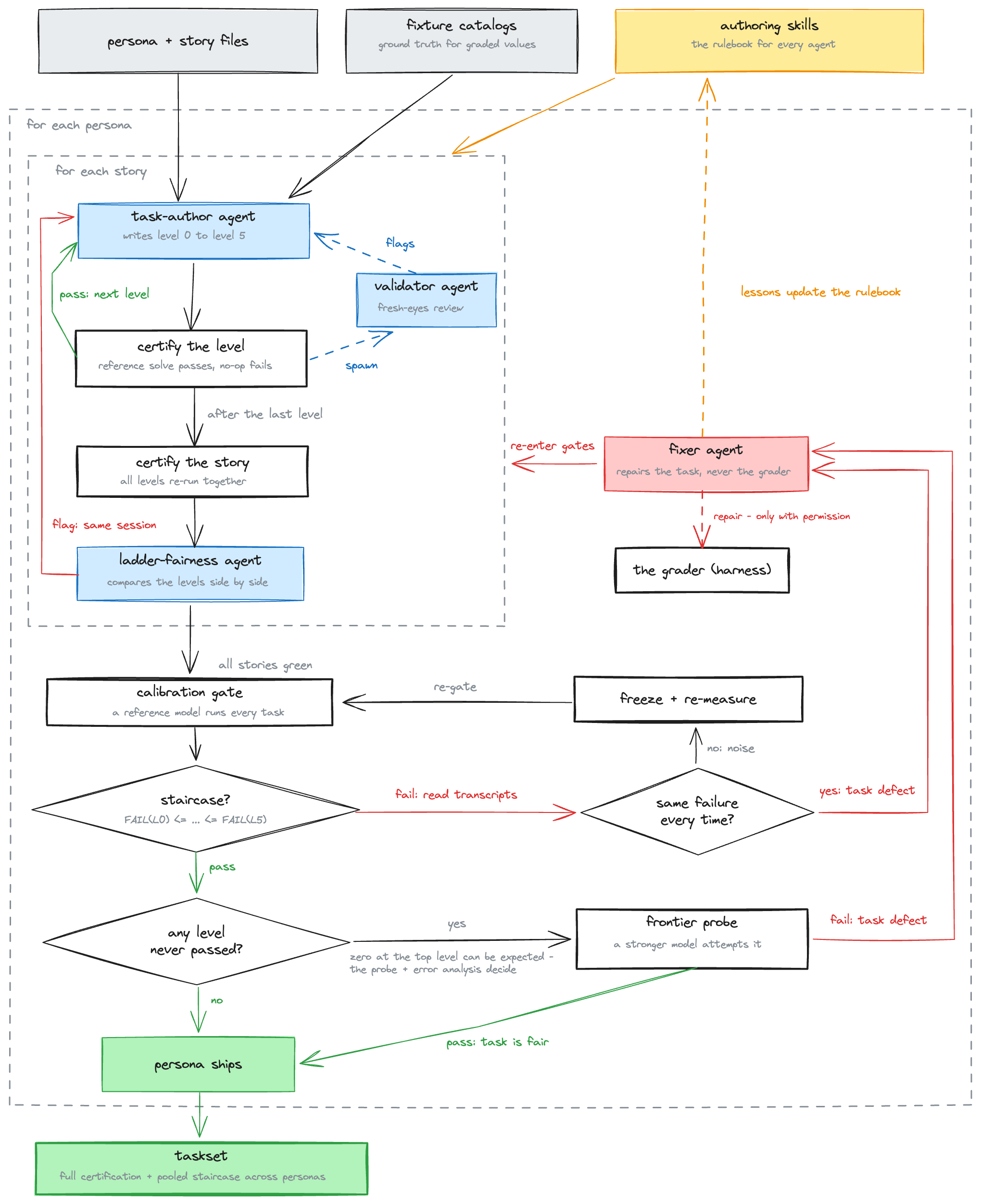
Here's the whole thing traced step by step, from a blank story file to a sealed taskset.
Writing and certifying a level
The task-author agent opens the loop: a separate codex --yolo session with GPT-5.6, spawned with a one-page brief whose first instruction is to read the task-author skill in full - the brief includes the persona, story and underlying data. It holds that story's facts and climbs all five levels requirements in that same session, since the levels share an accumulating world. This means that that very same subagent has access to the level spec, but even to the previous level taskset - so it can use as a relative comparison.
As each level certifies (the reference solve passes the grader, a do-nothing agent fails it), the task-author agent spawns a validator agent on it. This subagent has its own skill, running a fresh-eyes review in the background while the author moves straight to the next level (e.g. level 3 gets written while level 2 is still under review). Flags come back asynchronously and get fixed in the same author session. The purpose of this subagent is to, by looking solely at the task file, determine whether it looks feasible - i.e. if as check we are looking for a specific datapoint, but then from the widgets available and skills on the setup it doesn't seem that we have access to that datapoint, the agent can surface this.
Certifying the story, then the ladder
The five levels share the same underlying facts and fixtures, so the story doesn't close level by level - all five have to certify together. Fix a bug in level 4 and you can change something level 2 was relying on, and the only way to catch that is to re-run every level.
A ladder-fairness agent then reads all five files side by side, checking that the graded facts stay constant across levels - once all four stories are given the green light, the persona is ready for calibration. This is a really good check because allows to check how the tasks compare amongst themselves and that there's indeed an increasing level of difficulty among each, I think of it as a "standardization" where the subagent has access to all tasks and can level set accordingly.
Here's a simple example - compliance's case handoff, every level authored and certified, every per-level validator approved, until the ladder-fairness agent read the story's five files as a set and reported:
case_handoff: FLAG level0 - Constant-core rule violated: the eval does not grade the Case Review dashboard name, unlike the upper rungs.
The dashboard name is stated in the prompt at every rung, Execute through Compose - it isn't part of what the ladder is supposed to vary. So every level's eval should check it the same way, and level0's didn't. That's a small miss on the agent that authored this task, and only got caught when an independent agent saw the tasks side-by-side.
The skills
Every one of those sessions opens by reading a skill file in full. Four files, versioned markdown in the repo, one per role.
| skill | governs | purpose |
|---|---|---|
| task-author | writing a story's five levels | Writes one story's five levels, in the persona's voice, following the dial table for what each level is and isn't allowed to state. It's the only skill of the four that actually produces a task - the other three only review or run the loop. |
| task-validator | fresh-eyes review of one task | Reviews one finished level with nothing but the task file itself - no story, no persona, no author reasoning - so it sees exactly what an evaluated model would see. It can only raise a flag; someone else decides what happens to it. |
| task-level-fairness | judging a ladder as a set | Reads a finished set of five levels side by side and checks that the graded facts stay consistent across the ladder. That's the one check that can catch a problem invisible to anyone reviewing a single task at a time. |
| orchestrator | the loop itself | Runs the whole loop - personas one at a time, stories in sequence, fairness flags routed back to the session that wrote them - and never writes a task itself. Nothing commits until every level for a persona is certified green. |
The calibration gate
Once a persona's four stories are all green, a script (calibrate_workspace_tasks.py) runs the reference model - gpt-4.1-mini, same reasons as everywhere else in this post - over the persona's 20 tasks three times, twelve attempts per level. This is the empirical test of whether the difficulty labeling means anything: the failure curve has to climb the ladder, FAIL(L0) ≤ ... ≤ FAIL(L4), ties allowed.
Here's a failed gate - a mid-campaign run on the trading desk:
trading_desk: 0:75%  1:33%  2:25%  3:58%  4:17%
GATE FAIL: trading_desk staircase violated:
  - level3 (58%) > level2 (25%) - inversion
next: check whether the inverted level's failures repeat across attempts
      (defect fingerprint -> fix tasks) or scatter (noise -> note for review)
A failure that repeats on every attempt is a defect fingerprint, and it triggers another subagent: the fixer agent, briefed each time with the failing transcript, the evidence, and exactly what it's allowed to touch. It can only repair the task itself - the grader is shared across the whole benchmark, so touching it needs my explicit approval - because it would trigger having to re-run every taskset again. And every defect the fixer repairs gets added into the relevant skill as a rule, so later authors inherit the lessons ("we have continual learning at home lol").
This is actually where we got to in the end, nice staircase!
The bar is the pooled rate over 72 attempts per level, each black dot is one of the three repeats, and all three draw the same staircase shape independently - 85 / 60 / 36 / 17 / 0, no inversion anywhere in the pooled curve.
The frontier probe
Any level the reference model never passes at all gets special treatment, because zero at a late-stage level can be correct - Compose is supposed to sit right at the reference model's edge. The problem is that an expected zero and a genuinely broken task look identical in a pass-rate table. So every dead rung has to "prove" its feasibility: first a transcript diagnosis (is the model failing at the work, or just at a technicality?), then one episode of a frontier model - GPT-5.5 - against a task from that dead rung. If it passes, the rung is certified as an honest capability floor, and the zero stands.
Results
Every rate below is strict pass@1: one attempt per task, all checks or nothing. The reference model's row pools its three calibration repeats (360 episodes); every other model ran the sealed 120 once, closed-world, discovering every dashboard through the snapshot tool. These numbers are the floor given this harness is a bare model loop with no planning scaffold, no retries, no web access. So a model dropped into a real harness, with backend examples a search away, should land well above its row here.
The reference staircase is the acceptance bar we mentioned above, and that tracks (85 / 60 / 36 / 17 / 0), falling monotonically. But only half the curves fall monotonically down the ladder - GLM-5.2, the reference model, and qwen3:8b. The other three each invert somewhere, and not the same somewhere: Gemini Flash inverts twice, GPT-5.5 recovers at Compose right after dipping at Ground, and gpt-oss:20b rises from Find to Derive before collapsing. Since there are 24 tasks per level, bear in mind the close calls could be sampling noise.
One interesting one is the Compose column - 0% for the reference, both locals, and Gemini Flash; 67% for the strongest open-weights model; 96% for the frontier.
Those Compose zeros aren't all the same zero, though. gpt-4.1-mini and Gemini Flash both earn 88-93% of the graded checks before dropping one piece of the arc - a near-complete chain scores 0 under strict pass@1.
The two local models tie on four of five levels, but a full rerun that I did on fresh samples shows that's mostly coincidence - the two models fail by different mechanisms (more on that below). For the Find L1 and Compose L4 it's actually the difficulty of the tasks, that both models aren't able to overcome.
Failure analysis
missing_tool_call dominates every column - a graded read, add, or note that just never happened - and it scales inversely with capability: rare for the frontier, common for small models. missing_widget and missing_generated_widget are the same failure showing up state-side: the required view or note never landed.
Underneath the codes, each model fails its own way. The reference model (gpt-4.1-mini) guesses at widget ids instead of listing them first, maps a colloquial handle to the wrong near-neighbor, and sometimes skips the skill read on a terse ask. GLM-5.2 usually finds the right widget - it just configures it wrong, off by one parameter. Gemini Flash skips the graded evidence note more than any other model, and at Compose it attempts every piece of the build and gets some of the definitions wrong. The reference model, on that same rung, tends to skip pieces instead.
gpt-oss:20b and qwen3:8b land on the same numbers for different reasons. gpt-oss:20b likes to invent tools that don't exist (return_widget, even container.exec) until it burns through the invalid-call budget. qwen3:8b does the opposite: it takes the snapshot, lists the catalog, and stops without changing anything. Their matching rate at Find is that same difficulty cliff. Their Compose zeros come from the same near-miss pattern the Results section describes: almost the whole arc done, one piece missing, and pass@1 grades that as complete failure.
Here's that same breakdown by level instead of by code:
The fact that GPT-5.5 is so good is actually not surprising. Since I've been building apps for OpenBB Workspace, with the latest frontier models, I've felt the step function improvement as a result. Now I can one-shot applications using codex or claude code with frontier models.
What's next
This was a lot of fun, but also one of the experiments that were most time consuming. But I learned a lot. And I'm kinda proud of the task authoring pipeline I came up with - I think it could scale really well!
There are two main things I want to do next:
The first is improving Workspace MCP itself from these results. The failure analysis is not only a verdict on the models - it is a verdict on the tools: every too_many_invalid_calls bar is schema friction, every missing_tool_call on a knowledge read is discoverability, and digging on those traces will let me improve Workspace MCP. At the same time, we don't want to overfit MCP tools/resources so that it works for a small model but adds too much unnecessary context for a frontier model.
The second is turning the benchmark into a training environment. Every episode already leaves a full graded trace, the grader emits a clean pass/fail reward, and the deterministic simulator is a natural environment - which is what I need for RL rollouts. I was looking into converting these tasks into Harbor framework, so the same task JSON, simulator, and grader can drive rollouts at scale.
If agents are going to drive a financial workspace, I have to be able to measure how well they do it. Now I can.